 Équipora
Features
All Équipora modules
One software for working time, projects, purchasing and the shop floor. Every module connects to the others: a punch feeds the hours, a shop-floor task feeds the schedule, a delivery feeds the stock.
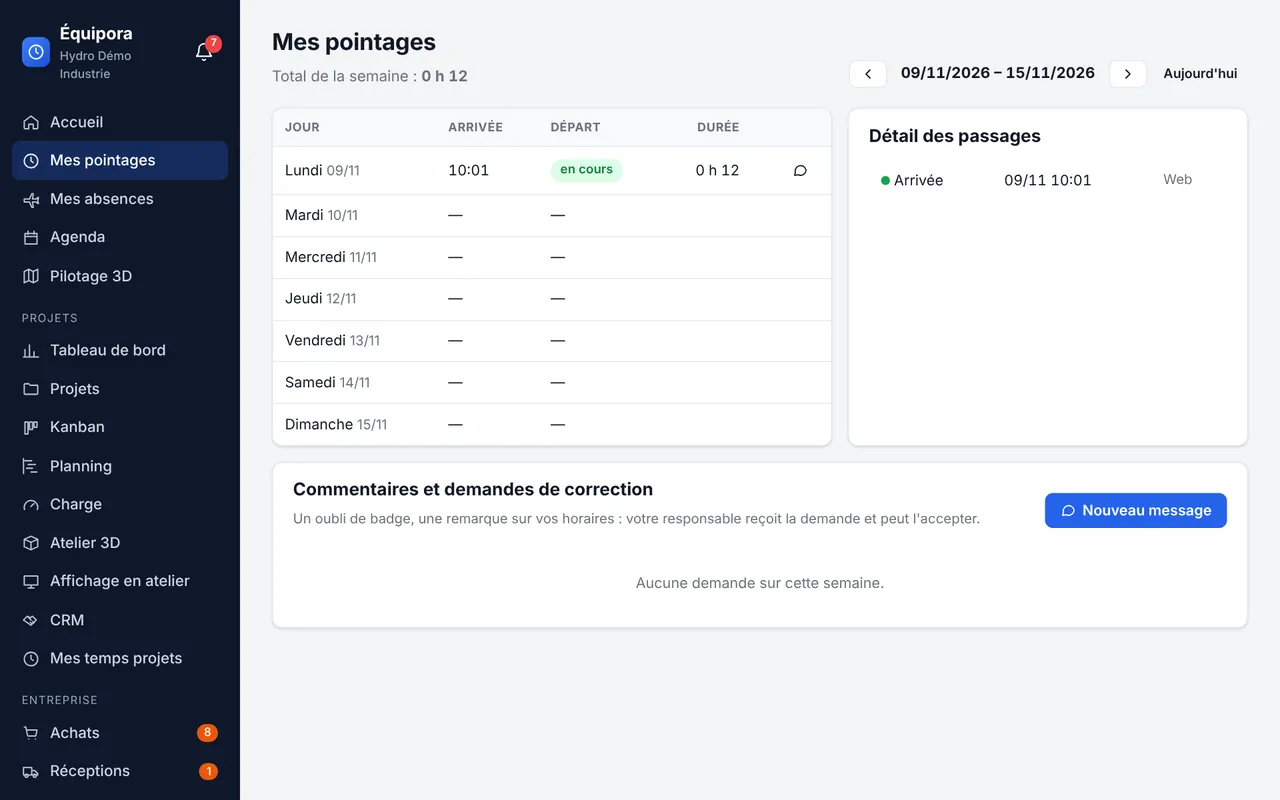
Time clock
Editions: Lite Éducation Pro Custom
A clock-in and clock-out button on a PC or phone. Équipora calculates daily and weekly hours and shows who is present, in real time.
- Daily and weekly hours, compared with the planned schedule
- Live team attendance (present, not yet arrived, absent, left)
- Corrections by managers, all logged
- Time record requests: the employee reports a missed punch with the actual time or comments on their hours; the manager accepts (the punch is created) or rejects
- CSV exports of hours (CSV exports option)
Time clock kiosk
Editions: Lite: optional Éducation Pro Custom
A tablet at the shop-floor entrance: everyone clocks in as they walk by, no computer needed.
- RFID or NFC badge (USB reader), QR code read by the camera, or employee ID + PIN
- Debounce: a double punch is only counted once
- Lockout after 5 wrong PINs
- Printable QR cards from the employee record
Absences and leave
Editions: Lite Éducation Pro Custom
Absence requests, their approval and leave balances, without spreadsheets or paper forms.
- Annual leave, RTT (reduced working time), sick leave, workplace accident, sick child, family event, training, unpaid leave… (editable list)
- Half days, French public holidays (Alsace-Moselle option)
- Approval by the manager, PDF or photo supporting documents (encrypted)
- Automatic or manual leave accrual
- June–May or calendar-year period, working days or business days
- Pro rata on hiring, optional carry-over, adjustments by HR
Employees, roles and responsibilities
Editions: Lite Éducation Pro Custom
Profiles are created directly in Équipora, with a temporary password that the employee changes at first sign-in.
- Roles: administrator, HR, manager, employee; reporting lines
- Responsibilities on top of the role: purchase approval and authorisation, ordering, stock, customer portal…
- Notification bell: everyone sees what they need to approve
- PIN, badge and QR card for the kiosk
Calendar
Editions: Lite Éducation Pro Custom
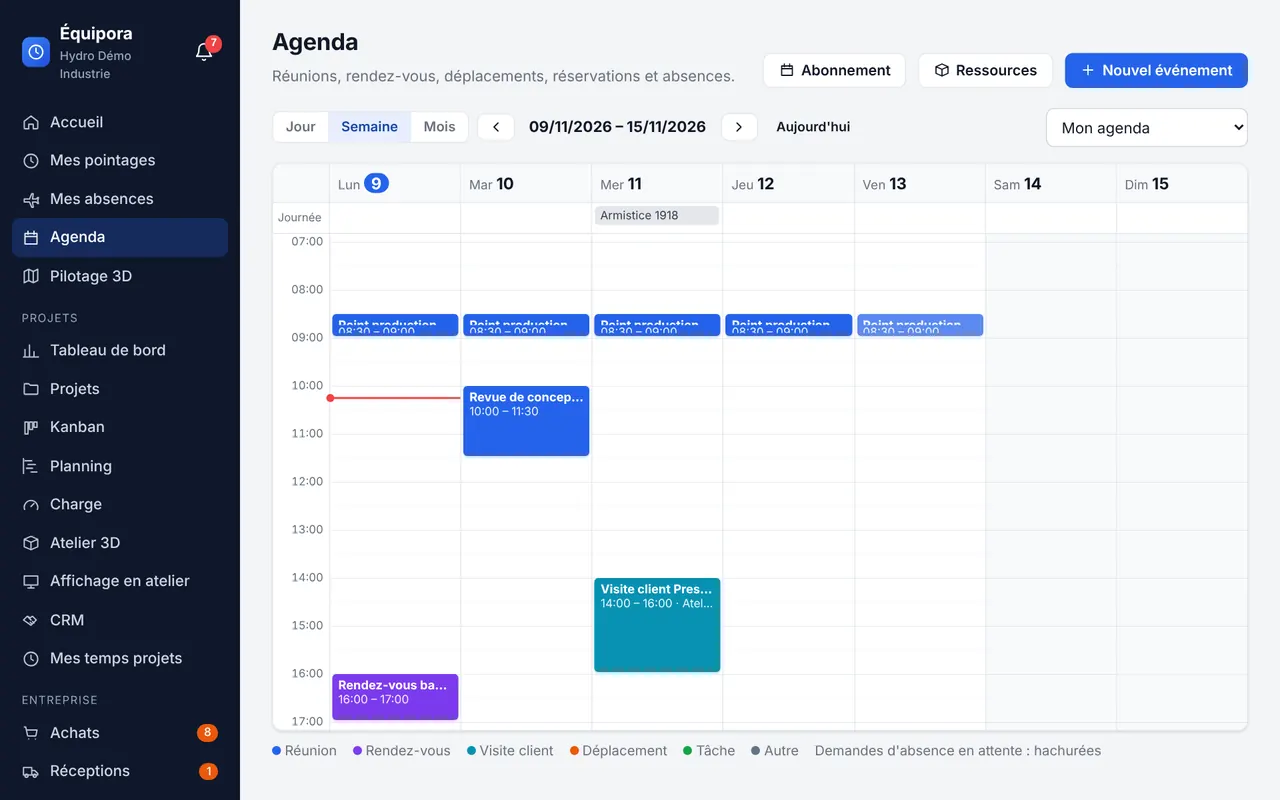
A shared calendar that knows about absences, public holidays and company resources.
- Day, week and month views
- Meetings, appointments, visits, business trips, with attendee responses
- Booking of rooms, vehicles or test benches, with no double booking
- Private events; iCalendar subscription for Outlook or Thunderbird
Projects
Editions: Lite: optional Éducation Pro Custom
Engineering jobs, shop-floor jobs, or both. From the dashboard to the time spent, everything is connected.
- Engineering, shop-floor or mixed jobs, milestones and reviews, tasks
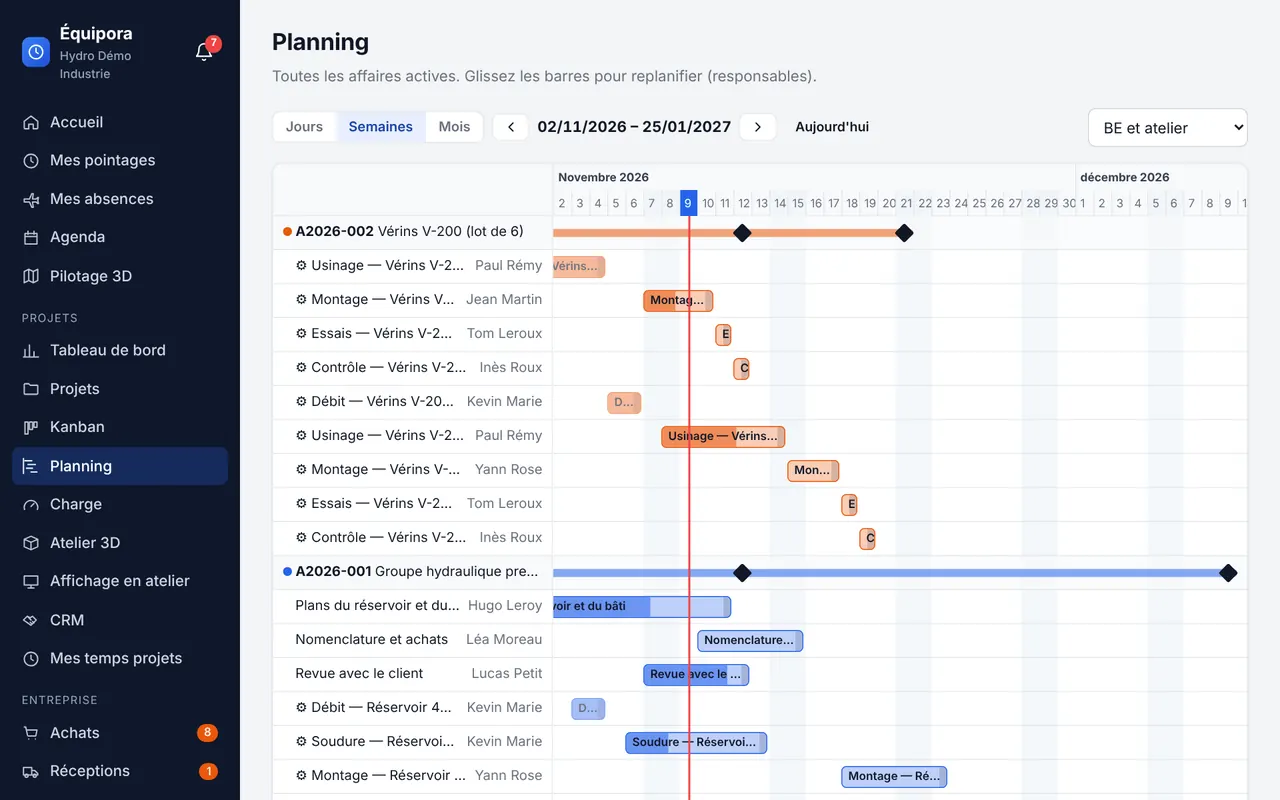
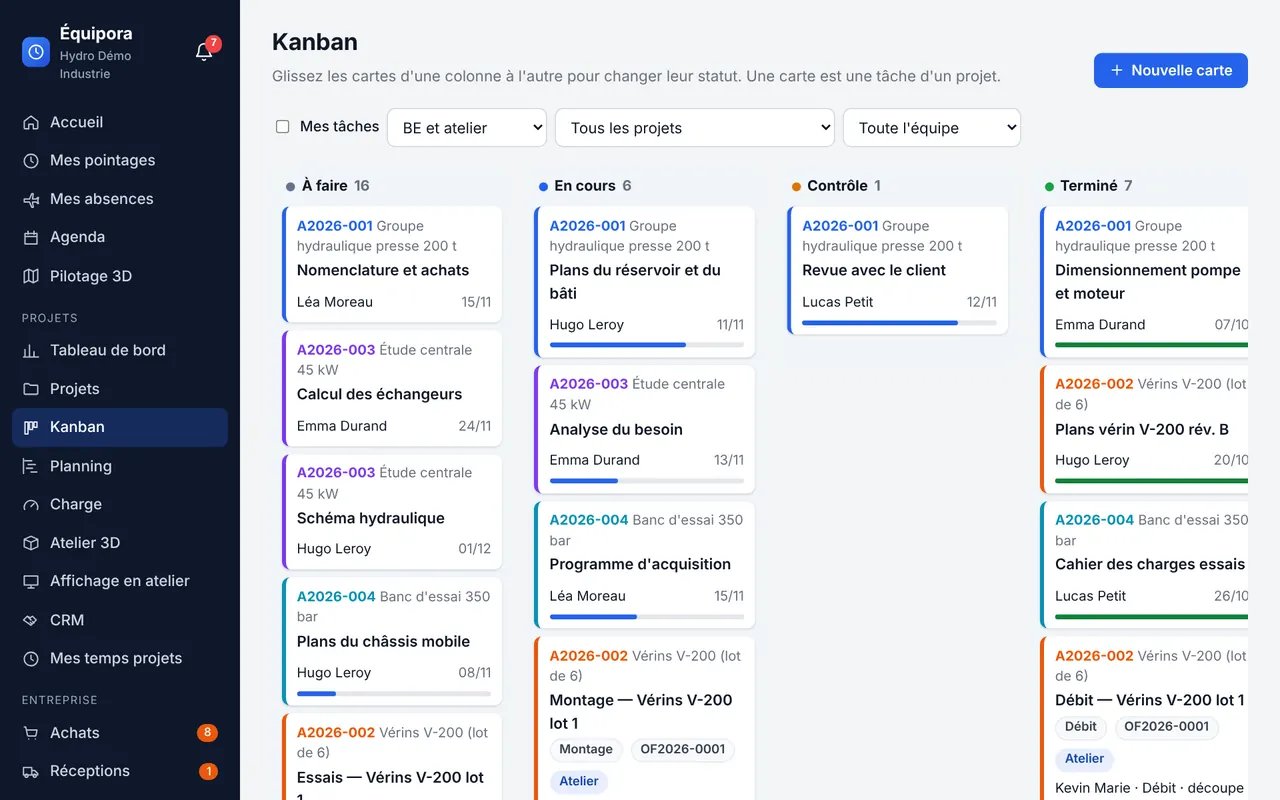
- Dashboard, Kanban, Gantt schedule with drag and drop
- Workload per person and per workstation
- Time spent: kiosk, stopwatch or timesheet
Kanban and dashboard
Drag a card from one column to another to change its status. Filter by job, by team or by task type (engineering or shop floor). The dashboard summarises progress, planned and actual hours, and deadlines.
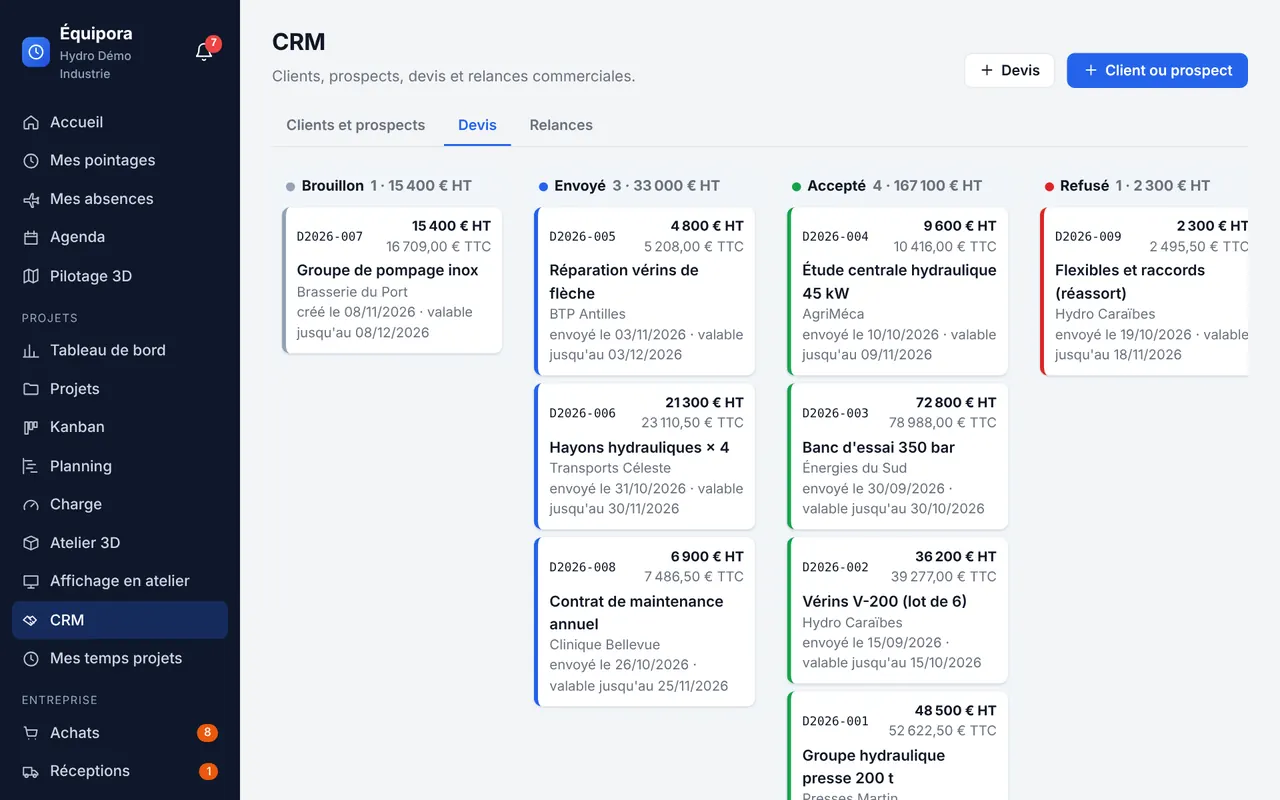
CRM
Editions: Lite: optional Éducation Pro Custom
Customers and prospects, contacts, quotes and interactions, in the same place as your jobs.
- Customer and prospect records, contacts
- Quote pipeline (draft, sent, accepted, declined), amounts excluding VAT, VAT and including VAT
- Dated interactions and follow-ups
Customer portal
Editions: Lite: optional Éducation: optional Pro Custom
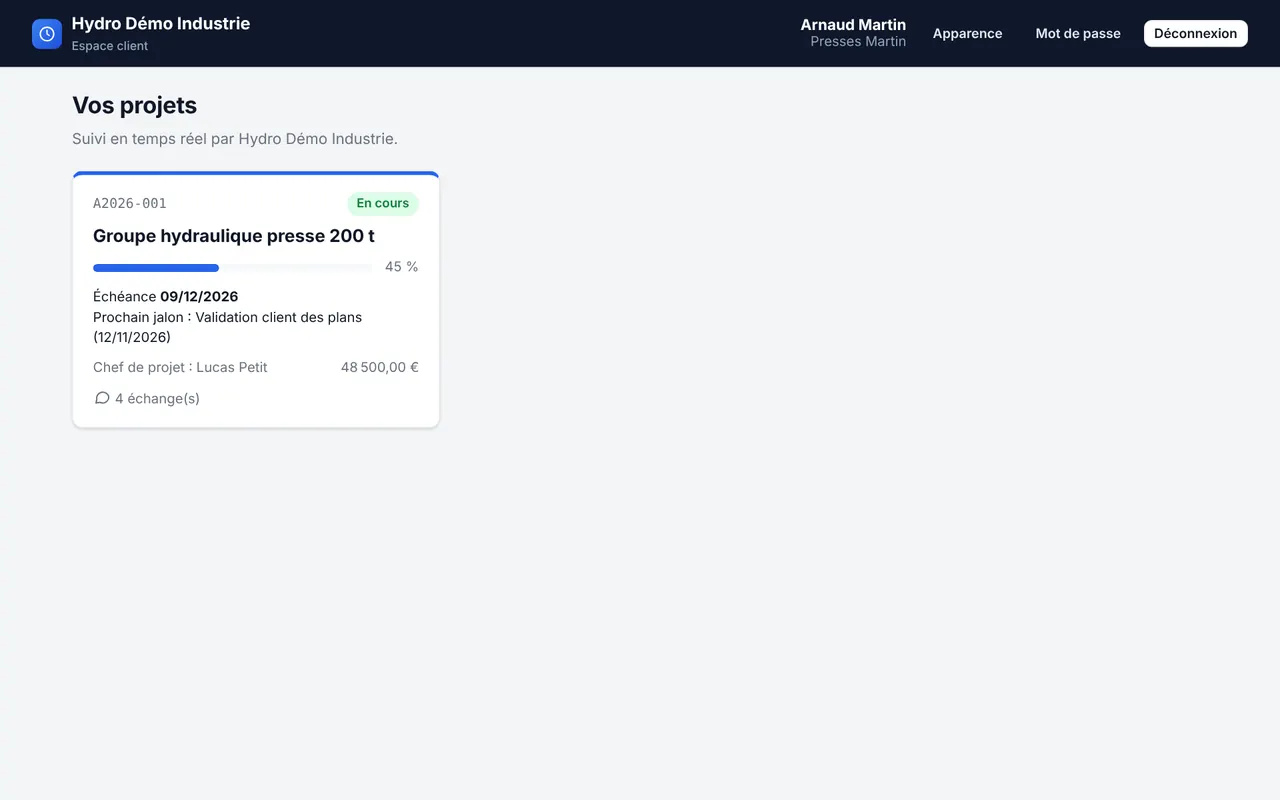
Separate access for your customers: they follow their jobs without calling you, and have access to nothing else.
- Progress, milestones, work orders, deliveries and budget, read-only
- Approved documents to download
- Customers can upload documents, comment and annotate
- Team replies and internal notes hidden from the customer
Purchasing
Editions: Lite: optional Éducation Pro Custom
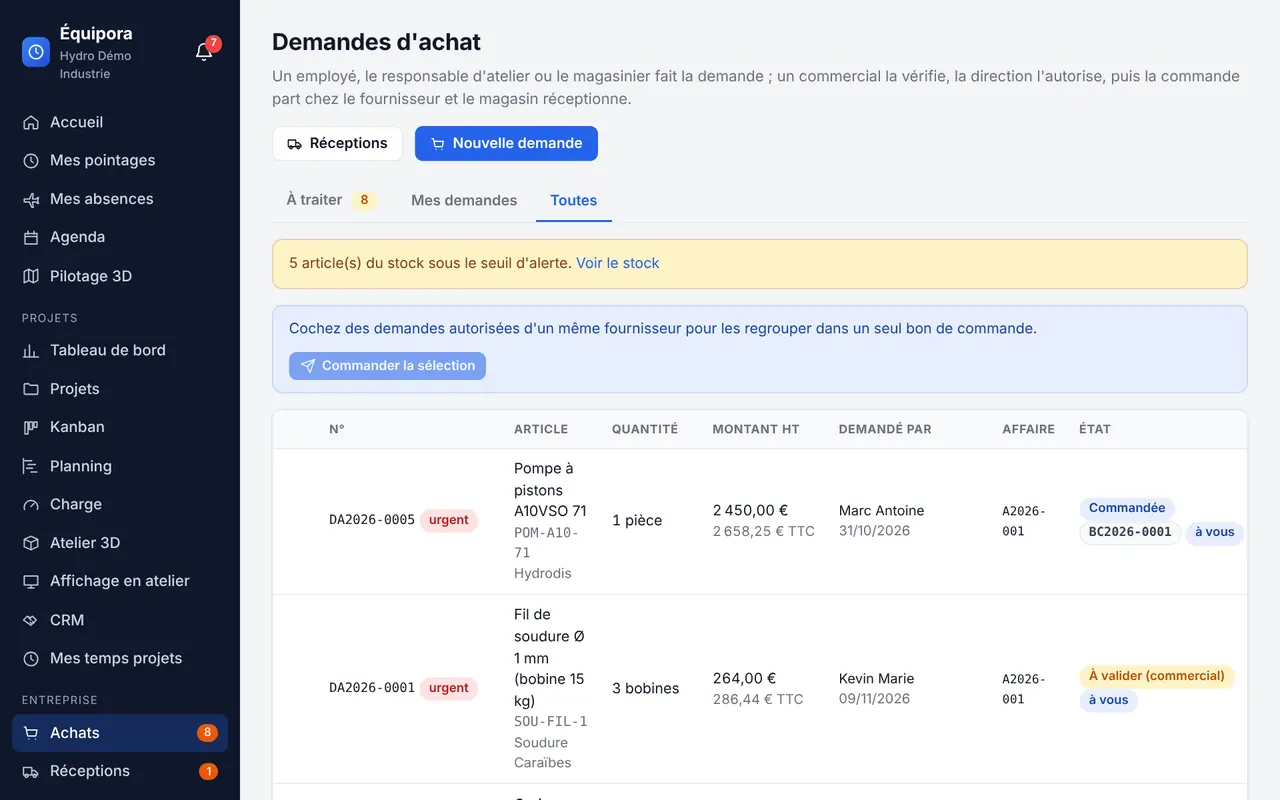
From purchase requests to purchase orders, with a clear approval workflow.
- Requests by the employee, the shop-floor supervisor or the storekeeper
- Review by a salesperson, authorisation by management
- Purchase orders grouped by supplier, sent as PDF from the company mailbox
- Automatic replenishment below the threshold, reviewed before sending
Receiving
Editions: Lite: optional Éducation Pro Custom
Take a photo of the delivery note or drop the PDF invoice: Équipora reads it in the browser and prepares the goods receipt.
- Text extraction from the PDF or character recognition on the photo
- Items, quantities and order identified; matching suggested or automatic
- Partial deliveries, invoice discrepancies, VAT read from invoices
Stock
Editions: Lite: optional Éducation Pro Custom
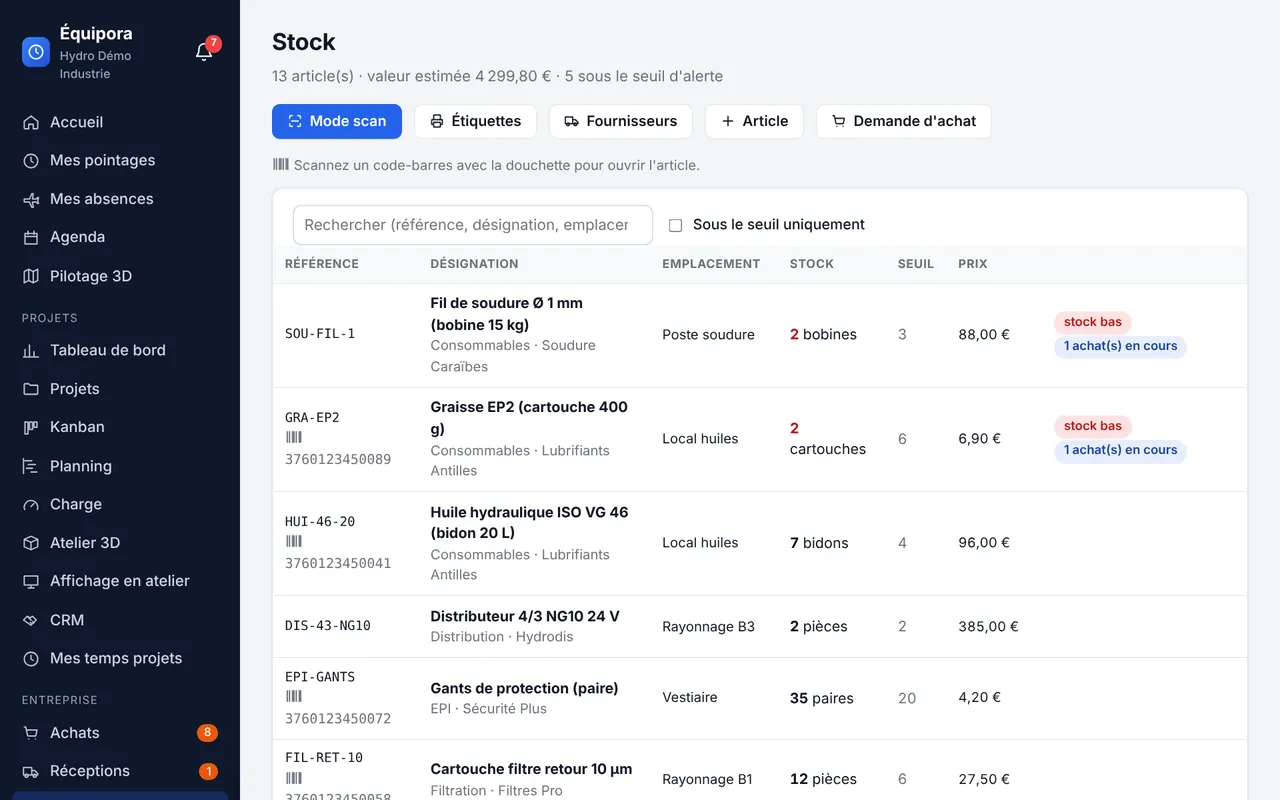
An up-to-date storeroom without re-keying, using a barcode scanner or the phone's camera.
- Items, suppliers, locations, alert thresholds
- Barcodes: USB or Bluetooth scanner, or camera
- Scan mode: stock in, stock out by job, stock counts
- Printable Code 128 labels
Engineering
Editions: Lite: optional Éducation Pro Custom
The drawings and 3D models of each job, with their revisions and approval.
- Documents with revisions and an approval workflow
- Built-in 3D viewer: STEP, glTF/GLB, OBJ, STL; section, measure, wireframe
- Automatic creation of the work order when a drawing is approved
Shop floor
Editions: Lite: optional Éducation Pro Custom
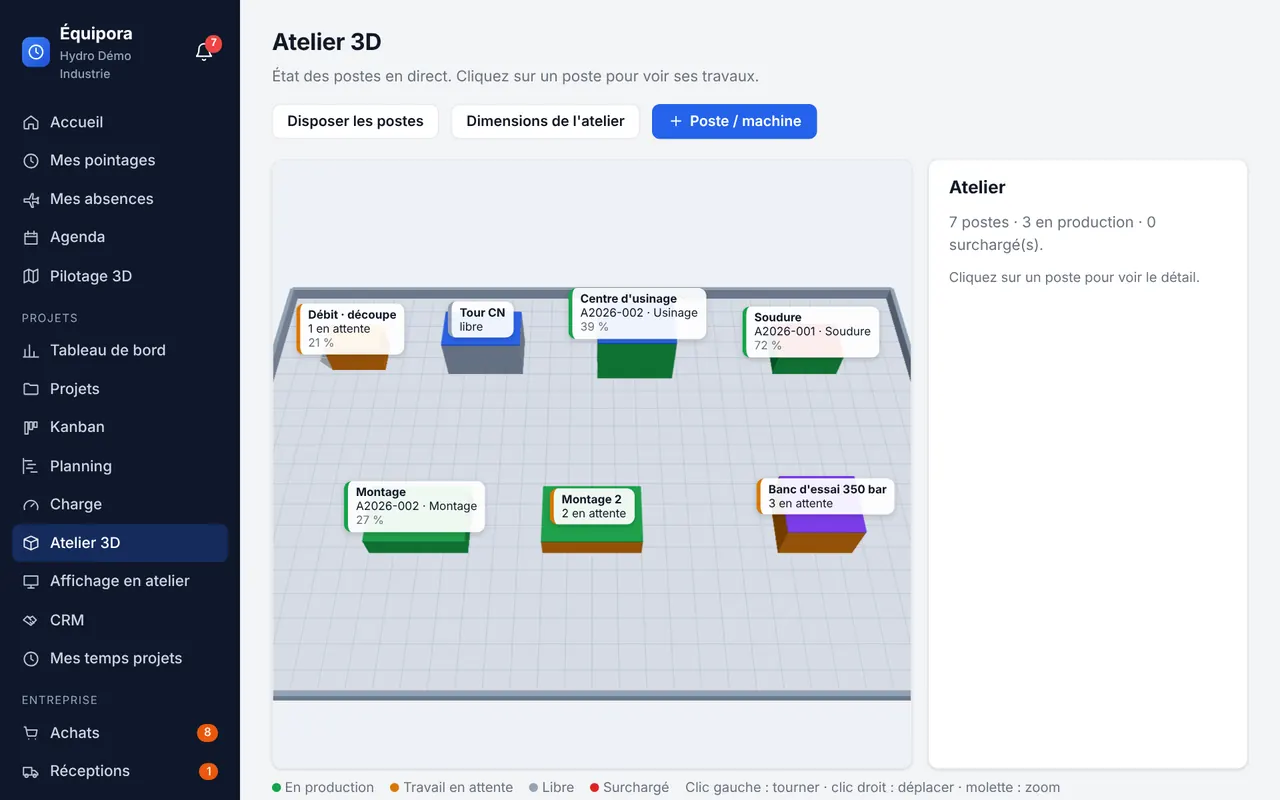
Work orders, their operations and workstations, with a 3D view of the shop floor.
- Work orders and operations: cutting, machining, welding, assembly, testing, inspection…
- Workstations and machines, laid out on the shop-floor plan
- Interactive 3D view of the shop floor: workstations in production, waiting, idle or overloaded
- Incoming and outgoing shipments: pending, partial, done
Shop-floor displays
Editions: Lite: optional Éducation Pro Custom
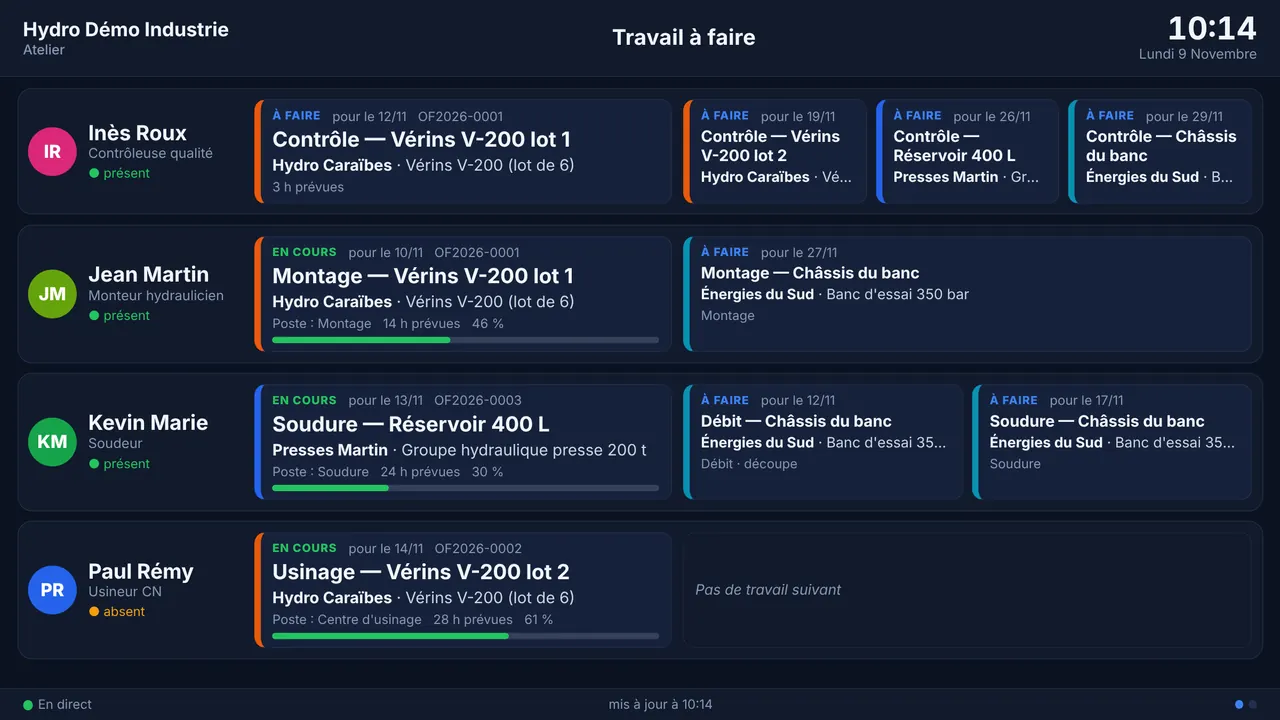
Each employee's work queue and shop-floor screens updated live: everyone knows what they are doing now and what comes next.
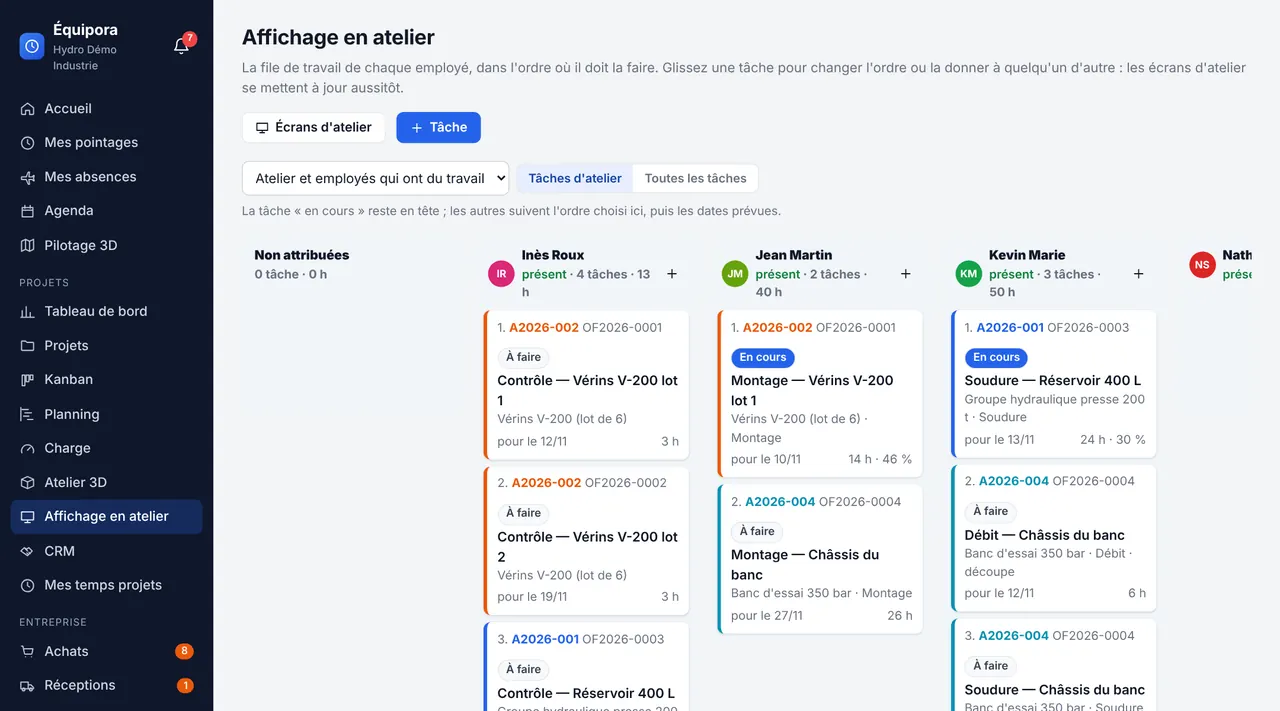
- Task order and assignment by drag and drop
- Live screens: Raspberry Pi, Linux mini PC, Windows PC or any browser; ESP32 example
- Current task, progress, planned hours, next tasks
- Attendance of each person (clocked in, absent…)
Work queues
One column per employee, with tasks in the order in which they must be done. Drag a task to change the order or assign it to someone else: shop-floor screens update instantly.
3D Site View
Editions: Lite: optional Éducation Pro Custom
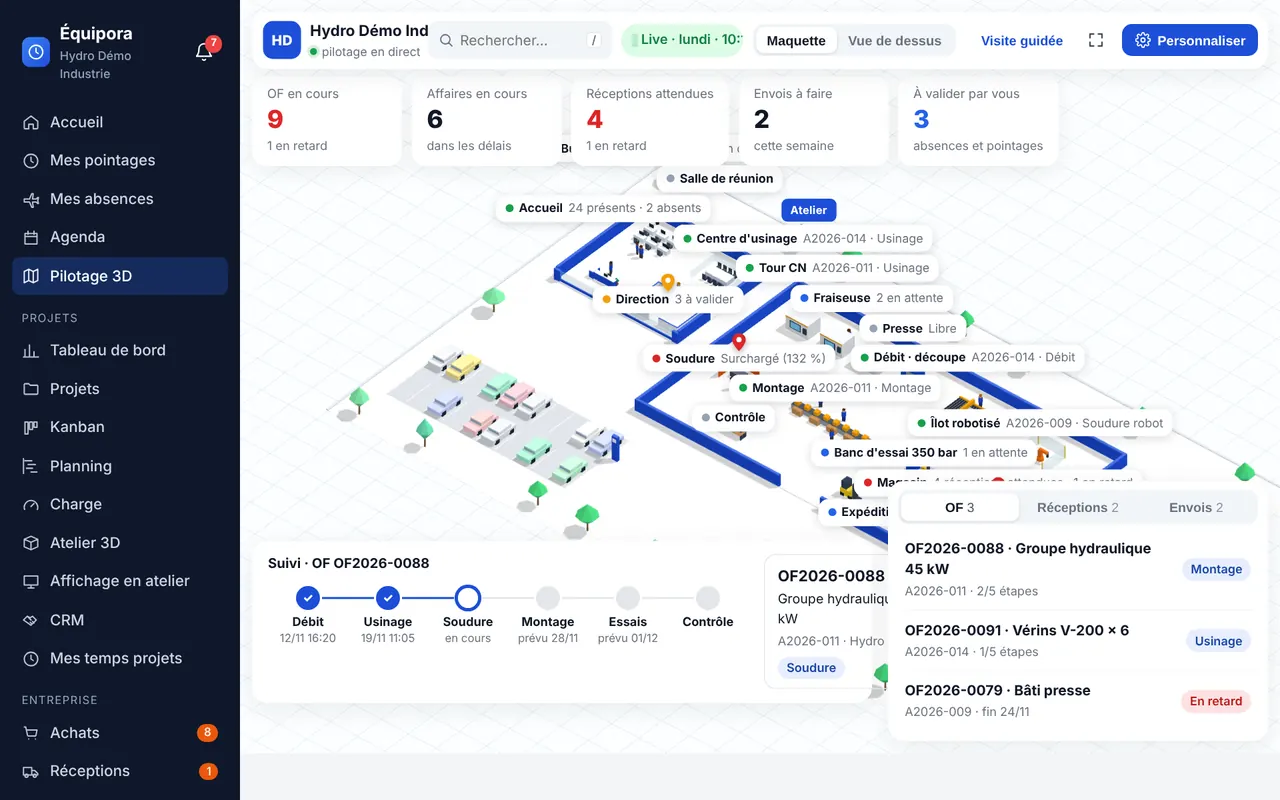
An interactive 3D model of your company, animated live: attendance, workstations, work orders, logistics, quotes and requests awaiting approval.
- 16 business templates (retail, garages, manufacturing, maintenance, containers), fully customisable
- Daily indicators: work orders in progress and overdue, incoming and outgoing deliveries, approvals
- Guided tour and demo mode for your reception area or a trade show
IT: assets and helpdesk
Editions: Lite: optional Éducation: optional Pro Custom
Your company's IT assets and support for your staff, in the same place as their hours and projects.
- Support requests (tickets): categories, P1 to P4 priority, screenshots, target times and overdue tickets, internal notes, satisfaction
- Assets: PCs, laptops, printers, phones, network; asset tags, assignments, warranties, invoices, barcode labels, export
- Software, licences and subscriptions: seats, renewal dates, costs, encrypted licence keys
- “My equipment” for each employee, knowledge base suggested while a request is being entered
- Automatic tickets when an employee joins or leaves; technician and IT manager roles
And also
VAT
Company default rate, editable rate or no VAT on each quote, purchase request and purchase order. Amounts excluding VAT, VAT and including VAT everywhere.
Suggestion box
Employee suggestions (anonymous if they wish), internal HR discussion, decision with an implementation date. Included in all editions.
Audit log
Traceability of sensitive actions: corrections, approvals, viewing of supporting documents… Included in Pro, optional in other editions.
Updates
Signed packages, backup before installation. The administrator approves the installation, or it runs automatically overnight.
Built-in help
A complete guide and 27 illustrated step-by-step tutorials in the software, available offline.
Bugs and suggestions
“Report a bug” and “Make a suggestion”, with photos, sent directly to the publisher (automatically resent if offline).
Which modules for your company?
Compare the editions, or describe your needs: we will suggest the right combination.